 Objective:
-
- Students will use free tools to make characters that represent themselves.
- 11:50-12:00: Start of Class
- Warm-Up: 2026-08-28: Character Attributes
- Think about if you made a cartoon character based loosely on yourself. Make a list of the attributes (clothing color, hairstyle, expression, etc.) it would have.
- This is an important part of today's Mini-Project, don't skip it.
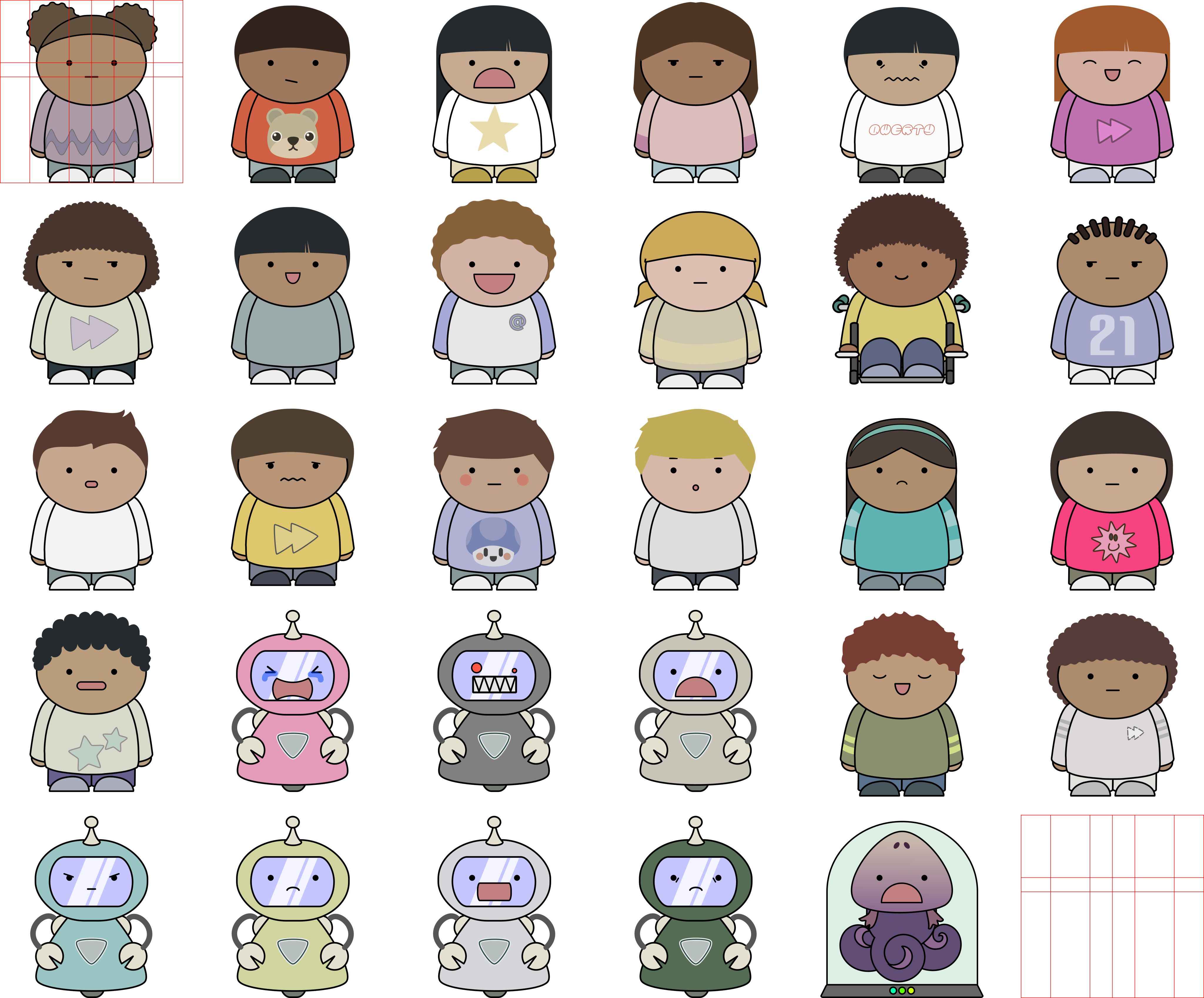
- If you finish early enough, download this SVG file and open it in Inkscape. (If you are doing this from home, VectorPea is a web-based alternative.
- Warm-Ups are usually a 5 point Independent Work grade if a written response is expected, or a 5 point Assessment grade if the Warm-Up is a quiz. They are due at the start of class and not eligible for late submission or re-submission.
- Announcements:
- Computer Buying Guide | Camera Buying Guide | Project Suggestions | "Portable" Software
- 12:00-12:55: Instruction & Student Work
- This video explains how to complete this assignment.
- Start with a template from here.
- Customize it using Inkscape (installed on the lab computers) or VectorPea.
- Rubric:
- File Type: Work is handed in as an SVG file.
- Dimensions: Document is scaled to be roughly the same size as the character.
- Subject: Work shows a character modified to represent the student handing in the work.
- Originality: While the expectation is that the work is made from public domain source SVG files, their arrangement and possible recoloring should be unique to the student handing it in.
- Use this form to hand in your work!.
- Check this spreadsheet to make sure you uploaded the correct thing!
- This 1-Day project is not eligible for late submission or re-submission without a Lawful Absence on file in the main office.
- Deadlines: (Content is subject to change due to various factors including All-Major days and inclement weather days.)
- Q1 Mini-Project Deadlines:
- One Day Lessons
- 08/26, Introduction
- Q1MP1 Inkscape Character, Due 08/28
- Q1MP2 Kdenlive Stinger, Due 09/01
- Q1MP3 Tenacity Interview, Due 09/03
- Q1P1: Digital Citizenship, Due 09/17
- Pick one of the following 3 projects:
- Digital Citizenship 1: Netiquette
- Digital Citizenship 2: Fact Checking
- Digital Citizenship 3: Copyright and Creative Commons
- Q1P1 Week 1 Exit Ticket Due 09/10
- Q1P1 Week 2 Exit Ticket Due 09/17
- Q1P1 Critique Day 09/22!
- Q1P1 Re-Submits Due 10/02!
- Remember, if the first deadline was missed, you CAN'T re-submit!
- Q1P2: Student Choice, Due 10/02
- Q1P2 Week 3 Exit Ticket Due 09/24
- Q1P2 Week 4 Exit Ticket Due 10/02
- Q1P2Critique Day 10/06!
- Q1P2 Re-Submits Due 10/17!
- Remember, if the first deadline was missed, you CAN'T re-submit!
- Q1P3: Student Choice, Due 10/14
-
- Q1P3 Week 5 Exit Ticket Due 10/08
- Q1P3 Week 6 Exit Ticket Due 10/14
- Q1P3 Critique Day 10/19!
- Remember, the last project of each Quarter is not eligible for re-submission due to its proximity to the grading window.
- Q2P1: Festival Entry 1: Pre-Production, Due 11/12
- Q2P1 Week 1 Exit Ticket Due 11/05
- Q2P1 Week 2 Exit Ticket Due 11/12
- Q2P1 Critique Day 11/16!
- Q2P1 Re-Submits Due 11/27!
- Remember, if the first deadline was missed, you CAN'T re-submit!
- ALSO: Since your NEXT project depends on THIS one being finished, DON'T WAIT UNTIL THE LAST MINUTE!
- Q2P2: Festival Entry 2: Production , Due 12/03
- Q2P2 Week 3 Exit Ticket Due 11/20
- Q2P2 Week 4 Exit Ticket Due 12/03
- Q2P2 Critique Day 12/07!
- Q2P2 Re-Submits Due 12/17!
- Remember, if the first deadline was missed, you CAN'T re-submit!
- ALSO: Since your NEXT project depends on THIS one being finished, DON'T WAIT UNTIL THE LAST MINUTE!
- Q2P3: Festival Entry 3: Post-Production , Due 12/17
- Q2P3 Week 5 Exit Ticket Due 12/11
- Q2P3 Week 6 Exit Ticket Due 12/17
- Q2P3 Critique Day 01/04!
- Q2P3 Re-Submits Due 01/14!
- Remember, if the first deadline was missed, you CAN'T re-submit!
- Q2P4: Student Choice, Due 01/14
- Q2P4 Week 7 Exit Ticket Due 01/08
- Q2P4 Week 8 Exit Ticket Due 01/14
- CQ2P4 Critique Day 01/19!
- Remember, the last project of each Quarter is not eligible for re-submission due to its proximity to the grading window.
- Projects are 100 point Classwork grades, and are not eligible for late submission.
- Feedback from the critiques is provided in the Canvas assignment for that project.
- Projects are eligible for re-submission, but only once. They must be resubmitted using the same form as before, and no later than 10 days after feedback has been shared with them in Canvas. The 4th project of each Quarter is not eligible for re-submission due to its proximity to the end of the Quarter!
- Deadlines for future projects are not adjusted. Students are encouraged to not put off starting Project 4 because they've decided to work on redoing Project 3 from scratch.
- 12:55-1:05: End of Class
- Save all work on your flash drive and back it up in Google Drive, as "I couldn't access my project" will not be seen as a valid excuse.
- If it's the last B Day of the week, submit the week's Classwork as an Exit Ticket, then check to make sure you uploaded the correct thing.
- Odd Numbered Exit Ticket Rubric:
| 4 pts |
Student has shared their plan for their current project. |
| 3 pts |
It is clear which project has been selected. |
| 3 pts |
It is clear that the student is following the rubric for their chosen project, even if they have not yet met all of the criteria. |
- Even numbered Exit Ticket Rubrics will vary, and are included with the project information.
- NOTE: Links that do not show any content and files that cannot be opened do not count towards the completion of this assignment. Sharing the work with the rest of the class is ESSENTIAL for getting a grade above a zero.
- Feedback from the critiques is provided in the Canvas assignment for that project.
- Properly shut down your assigned computer and line up, prepared to go to lunch.
Previous Lessons: 8/26, 8/28,